Post-Generation Checklist
From raw generation to model readiness — the complete post-gen checklist
Module 2Configuration Workshop45 minReference
⚠ ⚠ Known Broken ADO Links — Fix These First
The following ADO links are documented as broken or missing out of the box. Create these manually before any data loads:
Financial Planning: Vendor Hierarchy
Headcount: SYS by J2 Job · SYS by J3 Job · SYS by J4 Job (no link generated) · Job Grade
Use the ADO manual setup steps in the Configuration Guide to create them.
Required Tasks
1. Review Generation Logs
- Review PAF configuration logs for failed modules or line items
- Create any missing model elements manually using the template model as reference
- Verify no blank action mappings exist
- Run all validation actions and resolve errors
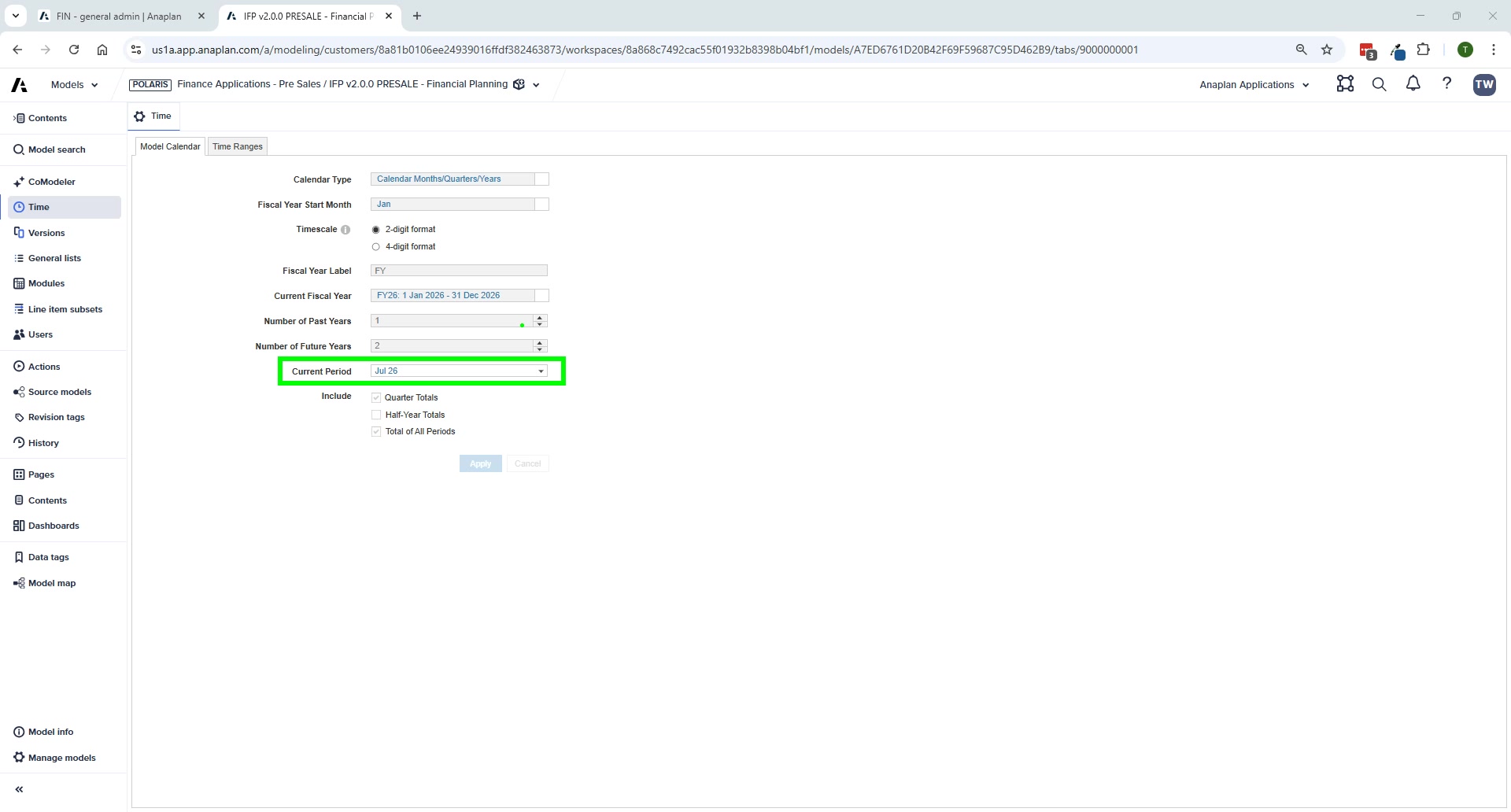
2. Time Settings (all models — must be consistent)
- Model Settings → Time: set fiscal year start month, current period, past/future years
- Set current period to July for demo environments — gives 6+6 forecast that displays well on screen
- All 4 models must have the same current year and current period
3. Version Alignment (all models)
- Create all required versions (Current Forecast Base, AOP Base, Prior Forecast, etc.)
- Set switchover dates for all versions
- Version names must be identical across all models
- Map versions in FIN – Manage Versions, HC – Manage Versions, CapEx – Manage Versions
4. Spoke Model Mapping
- Map the HC model to your workspace copy
- Map the CE model to your workspace copy (if deployed)
- Without this, data cannot flow from HC/CE into FP
5. Placeholder Row Detail List Members
- FP: add placeholders to Row Details – OpEx list
- FP: add placeholders to Row Details – Allocation list
- CE: add placeholders to Row Details – Asset list
- CE: add placeholders to Row Details – Disposals list
6. UX Fixes
| Fix | Pages Affected |
|---|---|
| Set page context to top level (not leaf) | Admin source-to-planning pages, HC map jobs to departments, BS manage cash offsets, OpEx allocation rule definition |
| Check grid filters generated correctly | All planning input pages |
| Verify correct line items shown/hidden | All planning grids — suppress check |
| Fix KPI card scaling (thousands/millions) | IS report, BS report |
| Fix form action fields | BS intangibles, BS investments, BS joint ventures, BS leases, HC job metadata |
| Reorder app categories (alphabetical → custom) | All app categories |
| Fix navigation links on landing page | Home/landing page |
| Check page selector order matches template | All pages with selectors |
7. Delete DEMO Actions
- Any action prefixed with "DEMO" is for manual data validation only
- Delete after generation — or after validating data loads
8. Build ADO Pipelines
See Data Load via ADO for complete step-by-step instructions.
Common Issues Quick Reference
| Symptom | Most Likely Cause | Fix |
|---|---|---|
| Blank dashboards | Mappings missing or selective access | Check Admin mapping pages; check user roles |
| HC costs not in FP | GL account mapping or import not run | Check HC – Update Mappings; run FIN – Import from HC Model |
| CapEx not in FP | Mapping or import not run | Check CapEx – General Admin; run FIN – Import from CapEx Model |
| ADO load errors | Source file format change | Validate source file; check ADO link mappings |
| Incorrect variances | Version mapping error | Check Manage Versions in all models |
| Planning grid empty | Dimensional selector at parent level | Set selector to leaf-level member |