Currency Translation
Currency triangulation — one set of rates, unlimited reporting currencies
Module 4Admin & Extensions20 min
The Triangulation Method
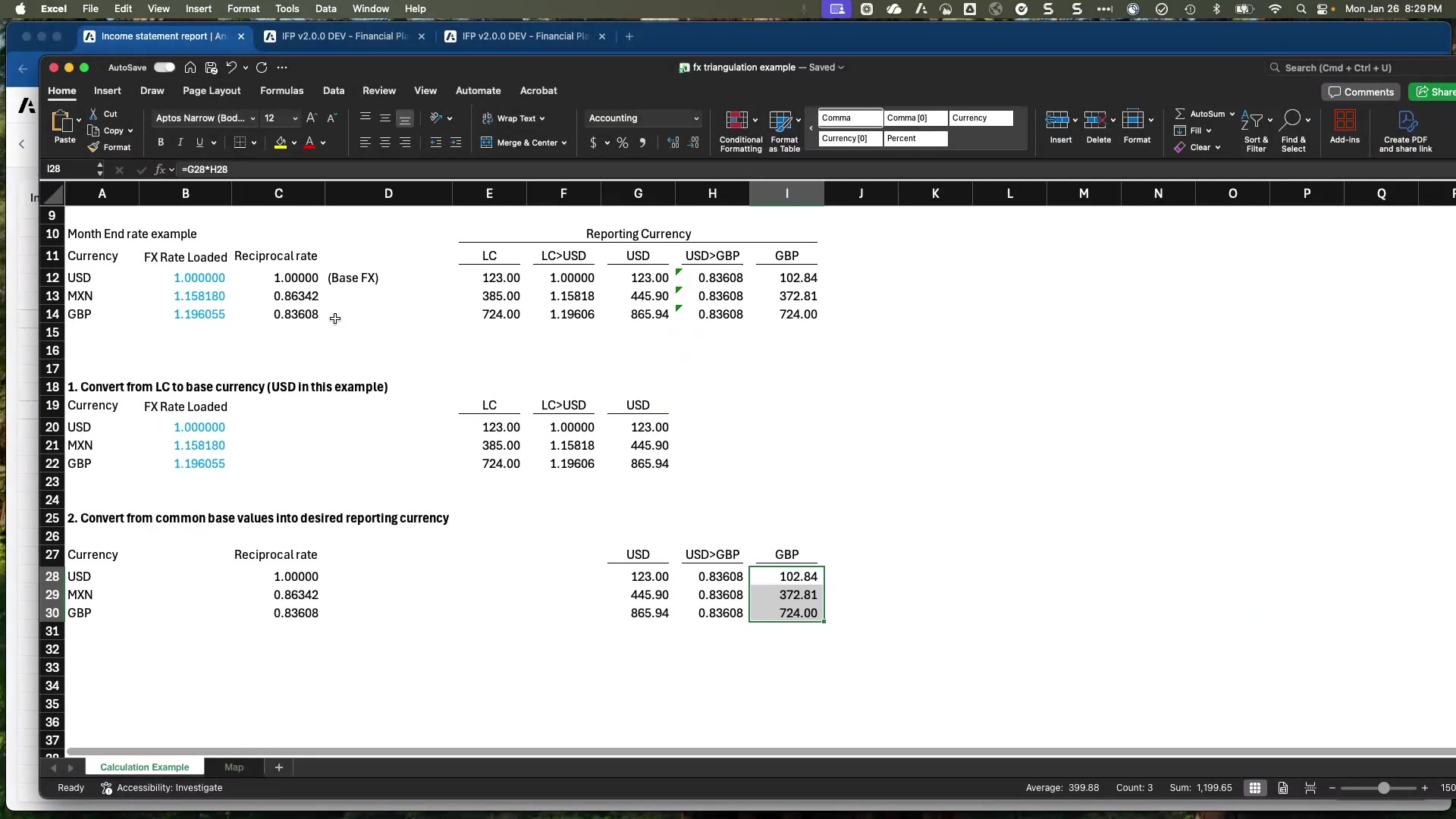
Instead of loading rates for every possible currency pair, triangulation uses a base currency (e.g., USD) as an intermediary:
- Load exchange rates: all local currencies → base currency (one set of rates)
- System automatically calculates reciprocal rates: base currency → any local currency (1 ÷ loaded rate)
- Combine: local → base rate × reciprocal base → reporting rate = local → any reporting currency
Adding a New Reporting Currency
💡 It's This Simple
To add a new reporting currency: (1) add the currency to the Report Currency list, (2) give it its currency code. Done. All financial data is immediately available in that currency — no module changes, no additional rate loads.
Rate Types
| Rate Type | Typical Use |
|---|---|
| Month-end rate | Balance sheet accounts (snapshot at period end) |
| Monthly average rate | Most P&L accounts (average over the period) |
| Historical rate | Equity section accounts (locked at original transaction rate) |
| Statistical rate | Non-financial metrics (headcount, units) — always = 1; never needs loading |
Architecture
| Component | Purpose |
|---|---|
| Currency Flat | List of all local currencies in the model |
| Report Currency dimension | Currencies available for reporting — add/remove freely |
| Exchange Rate data | Loaded rates: local currency → base currency |
| Entity → Local Currency attribute | Each leaf entity has its local currency as an attribute |
| GL Account → Rate Type attribute | Each IS and BS account has a rate type assigned |
ℹ Statistical Rate Type
The Statistical Rate Type is used for non-financial metrics like headcount and FTE counts. These always translate at a rate of 1 (no conversion needed). You don't need to load statistical rates — the system assumes 1 automatically.